Tokenizer Configuration
MidiTok’s tokenizers can be customized with a wide variety of options, and most of the preprocessing and downsampling steps can be tailored to your specifications.
Tokenizer config
All tokenizers are initialized with common parameters, that are hold in a miditok.TokenizerConfig object, documented below. A tokenizer’s configuration can be accessed with tokenizer.config.
Some tokenizers might take additional specific arguments / parameters when creating them.
- class miditok.TokenizerConfig(pitch_range: tuple[int, int] = (21, 109), beat_res: dict[tuple[int, int], int] = {(0, 4): 8, (4, 12): 4}, num_velocities: int = 32, special_tokens: Sequence[str] = ['PAD', 'BOS', 'EOS', 'MASK'], encode_ids_split: Literal['bar', 'beat', 'no'] = 'bar', use_velocities: bool = True, use_note_duration_programs: Sequence[int] = [-1, 0, 1, 2, 3, 4, 5, 6, 7, 8, 9, 10, 11, 12, 13, 14, 15, 16, 17, 18, 19, 20, 21, 22, 23, 24, 25, 26, 27, 28, 29, 30, 31, 32, 33, 34, 35, 36, 37, 38, 39, 40, 41, 42, 43, 44, 45, 46, 47, 48, 49, 50, 51, 52, 53, 54, 55, 56, 57, 58, 59, 60, 61, 62, 63, 64, 65, 66, 67, 68, 69, 70, 71, 72, 73, 74, 75, 76, 77, 78, 79, 80, 81, 82, 83, 84, 85, 86, 87, 88, 89, 90, 91, 92, 93, 94, 95, 96, 97, 98, 99, 100, 101, 102, 103, 104, 105, 106, 107, 108, 109, 110, 111, 112, 113, 114, 115, 116, 117, 118, 119, 120, 121, 122, 123, 124, 125, 126, 127], use_chords: bool = False, use_rests: bool = False, use_tempos: bool = False, use_time_signatures: bool = False, use_sustain_pedals: bool = False, use_pitch_bends: bool = False, use_programs: bool = False, use_pitch_intervals: bool = False, use_pitchdrum_tokens: bool = True, default_note_duration: int | float = 0.5, beat_res_rest: dict[tuple[int, int], int] = {(0, 1): 8, (1, 2): 4, (2, 12): 2}, chord_maps: dict[str, tuple] = {'7aug': (0, 4, 8, 11), '7dim': (0, 3, 6, 9), '7dom': (0, 4, 7, 10), '7halfdim': (0, 3, 6, 10), '7maj': (0, 4, 7, 11), '7min': (0, 3, 7, 10), '9maj': (0, 4, 7, 10, 14), '9min': (0, 4, 7, 10, 13), 'aug': (0, 4, 8), 'dim': (0, 3, 6), 'maj': (0, 4, 7), 'min': (0, 3, 7), 'sus2': (0, 2, 7), 'sus4': (0, 5, 7)}, chord_tokens_with_root_note: bool = False, chord_unknown: tuple[int, int] = None, num_tempos: int = 32, tempo_range: tuple[int, int] = (40, 250), log_tempos: bool = False, remove_duplicated_notes: bool = False, delete_equal_successive_tempo_changes: bool = False, time_signature_range: Mapping[int, list[int] | tuple[int, int]] = {4: [5, 6, 3, 2, 1, 4], 8: [3, 12, 6]}, sustain_pedal_duration: bool = False, pitch_bend_range: tuple[int, int, int] = (-8192, 8191, 32), delete_equal_successive_time_sig_changes: bool = False, programs: Sequence[int] = [-1, 0, 1, 2, 3, 4, 5, 6, 7, 8, 9, 10, 11, 12, 13, 14, 15, 16, 17, 18, 19, 20, 21, 22, 23, 24, 25, 26, 27, 28, 29, 30, 31, 32, 33, 34, 35, 36, 37, 38, 39, 40, 41, 42, 43, 44, 45, 46, 47, 48, 49, 50, 51, 52, 53, 54, 55, 56, 57, 58, 59, 60, 61, 62, 63, 64, 65, 66, 67, 68, 69, 70, 71, 72, 73, 74, 75, 76, 77, 78, 79, 80, 81, 82, 83, 84, 85, 86, 87, 88, 89, 90, 91, 92, 93, 94, 95, 96, 97, 98, 99, 100, 101, 102, 103, 104, 105, 106, 107, 108, 109, 110, 111, 112, 113, 114, 115, 116, 117, 118, 119, 120, 121, 122, 123, 124, 125, 126, 127], one_token_stream_for_programs: bool = True, program_changes: bool = False, max_pitch_interval: int = 16, pitch_intervals_max_time_dist: int | float = 1, drums_pitch_range: tuple[int, int] = (27, 88), ac_polyphony_track: bool = False, ac_polyphony_bar: bool = False, ac_polyphony_min: int = 1, ac_polyphony_max: int = 6, ac_pitch_class_bar: bool = False, ac_note_density_track: bool = False, ac_note_density_track_min: int = 0, ac_note_density_track_max: int = 18, ac_note_density_bar: bool = False, ac_note_density_bar_max: int = 18, ac_note_duration_bar: bool = False, ac_note_duration_track: bool = False, ac_repetition_track: bool = False, ac_repetition_track_num_bins: int = 10, ac_repetition_track_num_consec_bars: int = 4, **kwargs)
Tokenizer configuration, to be used with all tokenizers.
- Parameters:
pitch_range – range of note pitches to use. Pitches can take values between 0 and 127 (included). The General MIDI 2 (GM2) specifications indicate the recommended ranges of pitches per MIDI program (instrument). These recommended ranges can also be found in
miditok.constants. In all cases, the range from 21 to 108 (included) covers all the recommended values. When processing a MIDI file, the notes with pitches under or above this range can be discarded. (default:(21, 109))beat_res – beat resolutions, as a dictionary in the form:
{(beat_x1, beat_x2): beat_res_1, (beat_x2, beat_x3): beat_res_2, ...}. The keys are tuples indicating a range of beats, ex 0 to 3 for the first bar, and the values are the resolution (in samples per beat) to apply to the ranges, ex 8. This allows to useDuration/TimeShifttokens of different lengths / resolutions. Note: for tokenization withPositiontokens, the total number of possible positions will be set at four times the maximum resolution given (max(beat_res.values)). (default:{(0, 4): 8, (4, 12): 4})num_velocities – number of velocity bins. In the MIDI protocol, velocities can take up to 128 values (0 to 127). This parameter allows to reduce the number of velocity values. The velocities of the file will be downsampled to
num_velocitiesvalues, equally spaced between 0 and 127. (default:32)special_tokens – list of special tokens. The “PAD” token is required and will be included in the vocabulary anyway if you did not include it in
special_tokens. This must be given as a list of strings, that should represent either the token type alone (e.g.PAD) or the token type and its value separated by an underscore (e.g.Genre_rock). If two or more underscores are given, all but the last one will be replaced with dashes (-). (default:["PAD", "BOS", "EOS", "MASK"])encode_ids_split – allows to split the token ids before encoding them with the tokenizer’s model (BPE, Unigram, WordPiece), similarly to how words are split with spaces in text. Doing so, the tokenizer will learn tokens that represent note/musical events successions only occurring within bars or beats. Possible values for this argument are
"bar",beatorno. (default:bar)use_velocities – whether to use
Velocitytokens. The velocity is a feature from the MIDI protocol that corresponds to the force with which a note is played. This information can be measured by MIDI devices and brings information on the way a music is played. At playback, the velocity usually impacts the volume at which notes are played. If you are not using MIDI files, using velocity tokens will have no interest as the information is not present in the data and the default velocity value will be used. Not using velocity tokens allows to reduce the token sequence length. If you disable velocity tokens, the tokenizer will set the velocity of notes decoded from tokens to 100 by default. (default:True)use_note_duration_programs – list of the MIDI programs (i.e. instruments) for which the note durations are be tokenized. The durations of the notes of the tracks with these programs will be tokenized as
Duration_x.x.xtokens succeeding their associatedPitch/NoteOntokens. Note for rests:Resttokens are compatible when note Duration tokens are enabled. If you intend to use rests without enablingProgramtokens (use_programs), this parameter should be left unchanged (i.e. usingDurationtokens for all programs). If you intend to use rests while usingProgramtokens, all the programs in this parameter should also be in theprogramsparameter. (default: all programs from -1 (drums) to 127 included)use_chords – will use
Chordtokens, if the tokenizer is compatible. AChordtoken indicates the presence of a chord at a certain time step. MidiTok uses a chord detection method based on onset times and duration. This allows MidiTok to detect precisely chords without ambiguity, whereas most chord detection methods in symbolic music based on chroma features can’t. Note that using chords will increase the tokenization time, especially if you are working on music with a high “note density”. (default:False)use_rests – will use
Resttokens, if the tokenizer is compatible.Resttokens will be placed whenever a portion of time is silent, i.e. no note is being played. This token type is decoded as aTimeShiftevent. You can choose the minimum and maximum rests values to represent with thebeat_res_restargument. (default:False)use_tempos – will use
Tempotokens, if the tokenizer is compatible.Tempotokens will specify the current tempo. This allows to train a model to predict tempo changes. Tempo values are quantized accordingly to thenum_temposandtempo_rangeentries in theadditional_tokensdictionary (default is 32 tempos from 40 to 250). (default:False)use_time_signatures – will use
TimeSignaturetokens, if the tokenizer is compatible.TimeSignaturetokens will specify the current time signature. Note that REMI adds aTimeSignaturetoken at the beginning of each Bar (i.e. afterBartokens), while TSD and MIDI-Like will only represent time signature changes as they come. If you want more “recalls” of the current time signature within your token sequences, you can preprocess asymusic.Scoreobject to add moresymusic.TimeSignatureobjects. (default:False)use_sustain_pedals – will use
Pedaltokens to represent the sustain pedal events. In multitrack setting, The value of eachPedaltoken will be equal to the program of the track. (default:False)use_pitch_bends – will use
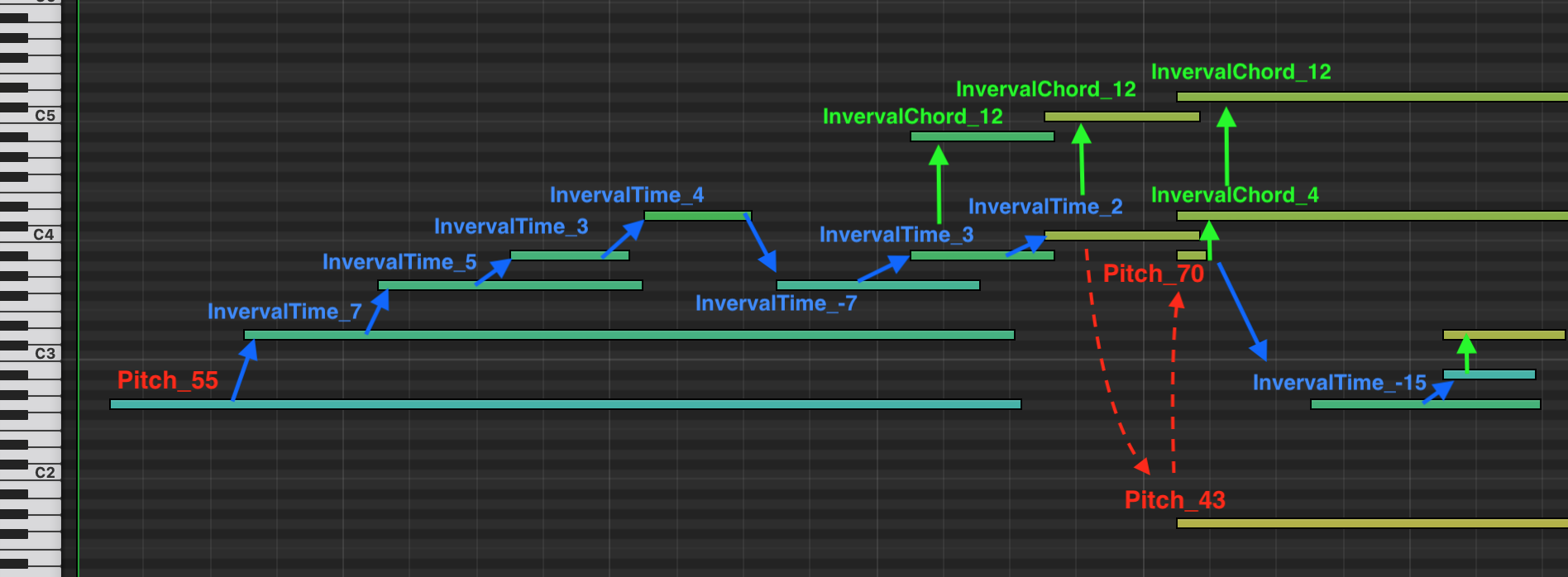
PitchBendtokens. In multitrack setting, aProgramtoken will be added before eachPitchBendtoken. (default:False)use_pitch_intervals – if given True, will represent the pitch of the notes with pitch intervals tokens. This way, successive and simultaneous notes will be represented with respectively
PitchIntervalTimeandPitchIntervalChordtokens. A good example is depicted in Additional tokens. This option is to be used with themax_pitch_intervalandpitch_intervals_max_time_distarguments. (default: False)use_programs – will use
Programtokens to specify the instrument/MIDI program of the notes, if the tokenizer is compatible (TSD, REMI, MIDI-Like, Structured and CPWord). Use this parameter with theprograms,one_token_stream_for_programsandprogram_changesarguments. By default, it will prepend aProgramtokens before eachPitch/NoteOntoken to indicate its associated instrument, and will treat all the tracks of a file as a single sequence of tokens. CPWord, Octuple and MuMIDI add aProgramtokens with the stacks ofPitch,VelocityandDurationtokens. The Octuple, MMM and MuMIDI tokenizers use nativelyProgramtokens, this option is always enabled. (default:False)use_pitchdrum_tokens – will use dedicated
PitchDrumtokens for pitches of drums tracks. In the MIDI protocol, the pitches of drums tracks corresponds to discrete drum elements (bass drum, high tom, cymbals…) which are unrelated to the pitch value of other instruments/programs. Using dedicated tokens for drums allow to disambiguate this, and is thus recommended. (default:True)default_note_duration – default duration in beats to set for notes for which the duration is not tokenized. This parameter is used when decoding tokens to set the duration value of notes within tracks with programs not in the
use_note_duration_programsconfiguration parameter. (default:0.5)beat_res_rest – the beat resolution of
Resttokens. It follows the same data pattern as thebeat_resargument, however the maximum resolution for rests cannot be higher than the highest “global” resolution (beat_res). Rests are considered complementary to other time tokens (TimeShift,BarandPosition). If in a given situation,Resttokens cannot represent time with the exact precision, other time times will complement them. (default:{(0, 1): 8, (1, 2): 4, (2, 12): 2})chord_maps – list of chord maps, to be given as a dictionary where keys are chord qualities (e.g. “maj”) and values pitch maps as tuples of integers (e.g.
(0, 4, 7)). You can usemiditok.constants.CHORD_MAPSas an example. (default:miditok.constants.CHORD_MAPS)chord_tokens_with_root_note – to specify the root note of each chord in
Chordtokens. Tokens will look likeChord_C:maj. (default:False)chord_unknown – range of number of notes to represent unknown chords. If you want to represent chords that does not match any combination in
chord_maps, use this argument. LeaveNoneto not represent unknown chords. (default:None)num_tempos – number of tempos “bins” to use. (default:
32)tempo_range – range of minimum and maximum tempos within which the bins fall. (default:
(40, 250))log_tempos – will use log scaled tempo values instead of linearly scaled. (default:
False)remove_duplicated_notes – will remove duplicated notes before tokenizing. Notes with the same onset time and pitch value will be deduplicated. This option will slightly increase the tokenization time. This option will add an extra note sorting step in the music file preprocessing, which can increase the overall tokenization time. (default:
False)delete_equal_successive_tempo_changes – setting this option True will delete identical successive tempo changes when preprocessing a music file after loading it. For examples, if a file has two tempo changes for tempo 120 at tick 1000 and the next one is for tempo 121 at tick 1200, during preprocessing the tempo values are likely to be downsampled and become identical (120 or 121). If that’s the case, the second tempo change will be deleted and not tokenized. This parameter doesn’t apply for tokenizations that natively inject the tempo information at recurrent timings (e.g. Octuple). For others, note that setting it True might reduce the number of
Tempotokens and in turn the recurrence of this information. Leave it False if you want to have recurrentTempotokens, that you might inject yourself by addingsymusic.Tempoobjects to asymusic.Score. (default:False)time_signature_range – range as a dictionary. They keys are denominators (beat/note value), the values can be either the list of associated numerators (
{denom_i: [num_i_1, ..., num_i_n]}) or a tuple ranging from the minimum numerator to the maximum ({denom_i: (min_num_i, max_num_i)}). (default:{8: [3, 12, 6], 4: [5, 6, 3, 2, 1, 4]})sustain_pedal_duration – by default, the tokenizer will use
PedalOfftokens to mark the offset times of pedals. By setting this parameter True, it will instead useDurationtokens to explicitly express their durations. If you use this parameter, make sure to configurebeat_resto cover the durations you expect. (default:False)pitch_bend_range – range of the pitch bend to consider, to be given as a tuple with the form
(lowest_value, highest_value, num_of_values). There will benum_of_valuestokens equally spaced betweenlowest_valueandhighest_value. (default:(-8192, 8191, 32))delete_equal_successive_time_sig_changes – setting this option True will delete identical successive time signature changes when preprocessing a music file after loading it. For examples, if a file has two time signature changes for 4/4 at tick 1000 and the next one is also 4/4 at tick 1200, the second time signature change will be deleted and not tokenized. This parameter doesn’t apply for tokenizations that natively inject the time signature information at recurrent timings (e.g. Octuple). For others, note that setting it
Truemight reduce the number ofTimeSigtokens and in turn the recurrence of this information. Leave itFalseif you want to have recurrentTimeSigtokens, that you might inject yourself by addingsymusic.TimeSignatureobjects to asymusic.Score. (default:False)programs – sequence of MIDI programs to use.
-1is used and reserved for drums tracks. Ifuse_programsis enabled, the tracks with programs outside of this list will be ignored during tokenization. (default:list(range(-1, 128)), from -1 to 127 included)one_token_stream_for_programs – when using programs (
use_programs), this parameters will make the tokenizer serialize all the tracks of asymusic.Scorein a single sequence of tokens. AProgramtoken will prepend eachPitch,NoteOnandNoteOfftokens to indicate their associated program / instrument. Note that this parameter is always set to True for MuMIDI. If disabled, the tokenizer will still useProgramtokens but will tokenize each track independently. (default:True)program_changes – to be used with
use_programs. If givenTrue, the tokenizer will placeProgramtokens whenever a note is being played by an instrument different from the last one. This mimics the ProgramChange MIDI messages. If given False, aProgramtoken will precede each note tokens instead. This parameter only apply for REMI, TSD and MIDI-Like. If you set it True while your tokenizer is not intone_token_streammode, aProgramtoken at the beginning of each track token sequence. (default:False)max_pitch_interval – sets the maximum pitch interval that can be represented. (default:
16)pitch_intervals_max_time_dist – sets the default maximum time interval in beats between two consecutive notes to be represented with pitch intervals. (default:
1)drums_pitch_range – range of pitch values to use for the drums tracks. This argument is only used when
use_drums_pitch_tokensisTrue. (default:(27, 88), recommended range from the GM2 specs without the “Applause” at pitch 88 of the orchestra drum set)ac_polyphony_track – enables track-level polyphony attribute control tokens using
miditok.attribute_controls.TrackOnsetPolyphony. (default:False).ac_polyphony_bar – enables bar-level polyphony attribute control tokens using
miditok.attribute_controls.BarOnsetPolyphony. (default:False).ac_polyphony_min – minimum number of simultaneous notes for polyphony attribute control. (default:
1)ac_polyphony_max – maximum number of simultaneous notes for polyphony attribute control. (default:
6)ac_pitch_class_bar – enables bar-level pitch class attribute control tokens using
miditok.attribute_controls.BarPitchClass. (default:False).ac_note_density_track – enables track-level note density attribute control tokens using
miditok.attribute_controls.TrackNoteDensity. (default:False).ac_note_density_track_min – minimum note density per bar to consider. (default:
0)ac_note_density_track_max – maximum note density per bar to consider. (default:
18)ac_note_density_bar – enables bar-level note density attribute control tokens using
miditok.attribute_controls.BarNoteDensity. (default:False).ac_note_density_bar_max – maximum note density per bar to consider. (default:
18)ac_note_duration_bar – enables bar-level note duration attribute control tokens using
miditok.attribute_controls.BarNoteDuration. (default:False).ac_note_duration_track – enables track-level note duration attribute control tokens using
miditok.attribute_controls.TrackNoteDuration. (default:False).ac_repetition_track – enables track-level repetition attribute control tokens using
miditok.attribute_controls.TrackRepetition. (default:False).ac_repetition_track_num_bins – number of levels of repetitions. (default:
10)ac_repetition_track_num_consec_bars – number of successive bars to compare the repetition similarity between bars. (default:
4)kwargs – additional parameters that will be saved in
config.additional_params.
- copy() TokenizerConfig
Copy the
TokenizerConfig.- Returns:
a copy of the
TokenizerConfig.
- classmethod from_dict(input_dict: dict[str, Any], **kwargs) TokenizerConfig
Instantiate an
TokenizerConfigfrom a Python dictionary.- Parameters:
input_dict – Dictionary that will be used to instantiate the configuration object.
kwargs – Additional parameters from which to initialize the configuration object.
- Returns:
The
TokenizerConfigobject instantiated from those parameters.
- classmethod load_from_json(config_file_path: Path) TokenizerConfig
Load a tokenizer configuration from a JSON file.
- Parameters:
config_file_path – path to the configuration JSON file to load.
- property max_num_pos_per_beat: int
Returns the maximum number of positions per ticks covered by the config.
- Returns:
maximum number of positions per ticks covered by the config.
- save_to_json(out_path: Path) None
Save a tokenizer configuration as a JSON file.
- Parameters:
out_path – path to the output configuration JSON file.
- to_dict(serialize: bool = False) dict[str, Any]
Serialize this configuration to a Python dictionary.
- Parameters:
serialize – will serialize the dictionary before returning it, so it can be saved to a JSON file.
- Returns:
Dictionary of all the attributes that make up this configuration instance.
- property using_note_duration_tokens: bool
Return whether the configuration allows to use note duration tokens.
- Returns:
whether the configuration allows to use note duration tokens for at least one program.
How MidiTok handles time
MidiTok handles time by resampling the music file’s time division (time resolution) to a new resolution determined by the beat_res attribute of of miditok.TokenizerConfig. This argument determines which time tokens are present in the vocabulary.
It allows to create Duration and TimeShift tokens with different resolution depending on their values. It is typically common to use higher resolutions for short time duration (i.e. short values will be represented with greater accuracy) and lower resolutions for higher time values (that generally do not need to be represented with great accuracy).
The values of these tokens take the form of tuple as: (num_beats, num_samples, resolution). For instance, the time value of token (2, 3, 8) corresponds to 2 beats and 3/8 of a beat. (2, 2, 4) corresponds to 2 beats and half of a beat (2.5).
For position-based tokenizers, the number of Position in the vocabulary is equal to the maximum resolution found in beat_res.
An example of the downsampling applied by MidiTok during the preprocessing is shown below.

Original MIDI file from the Maestro dataset with a 4/4 time signature. The numbers at the top indicate the bar number (125) followed by the beat number within the bar.

MIDI file with time downsampled to 8 samples per beat.
Additional tokens
MidiTok offers to include additional tokens on music information. You can specify them in the tokenizer_config argument (miditok.TokenizerConfig) when creating a tokenizer. The miditok.TokenizerConfig documentations specifically details the role of each of them, and their associated parameters.
Tokenization |
Tempo |
Time signature |
Chord |
Rest |
Sustain pedal |
Pitch bend |
Pitch interval |
|---|---|---|---|---|---|---|---|
MIDILike |
✅ |
✅ |
✅ |
✅ |
✅ |
✅ |
✅ |
REMI |
✅ |
✅ |
✅ |
✅ |
✅ |
✅ |
✅ |
TSD |
✅ |
✅ |
✅ |
✅ |
✅ |
✅ |
✅ |
Structured |
❌ |
❌ |
❌ |
❌ |
❌ |
❌ |
❌ |
CPWord |
✅ |
✅¹ |
✅ |
✅¹ |
❌ |
❌ |
❌ |
Octuple |
✅ |
✅² |
❌ |
❌ |
❌ |
❌ |
❌ |
MuMIDI |
✅ |
❌ |
✅ |
❌ |
❌ |
❌ |
❌ |
MMM |
✅ |
✅ |
✅ |
❌ |
✅ |
✅ |
✅ |
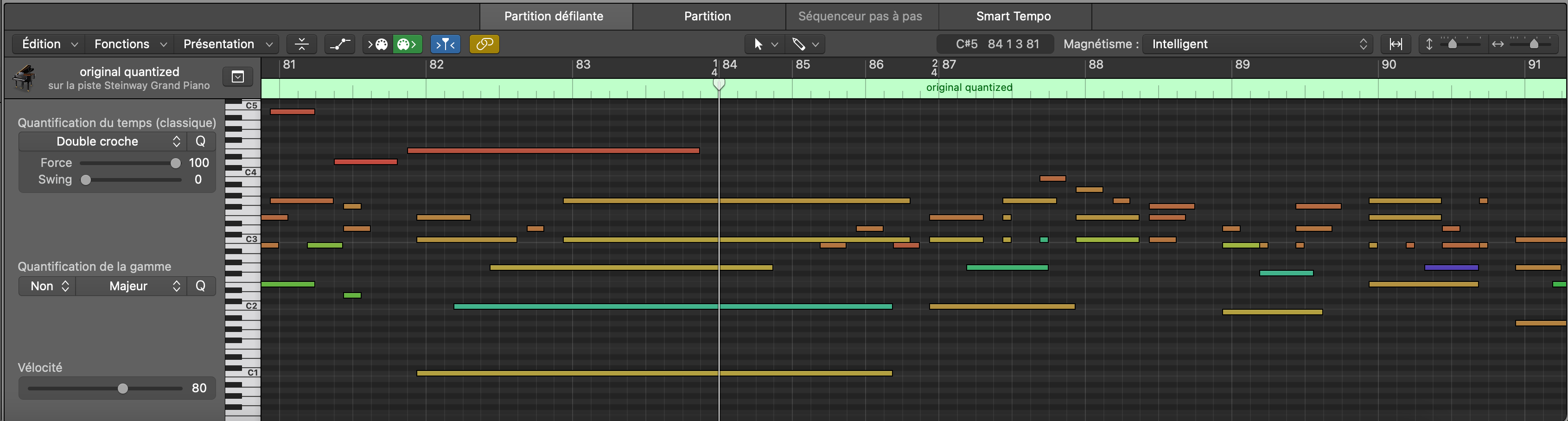
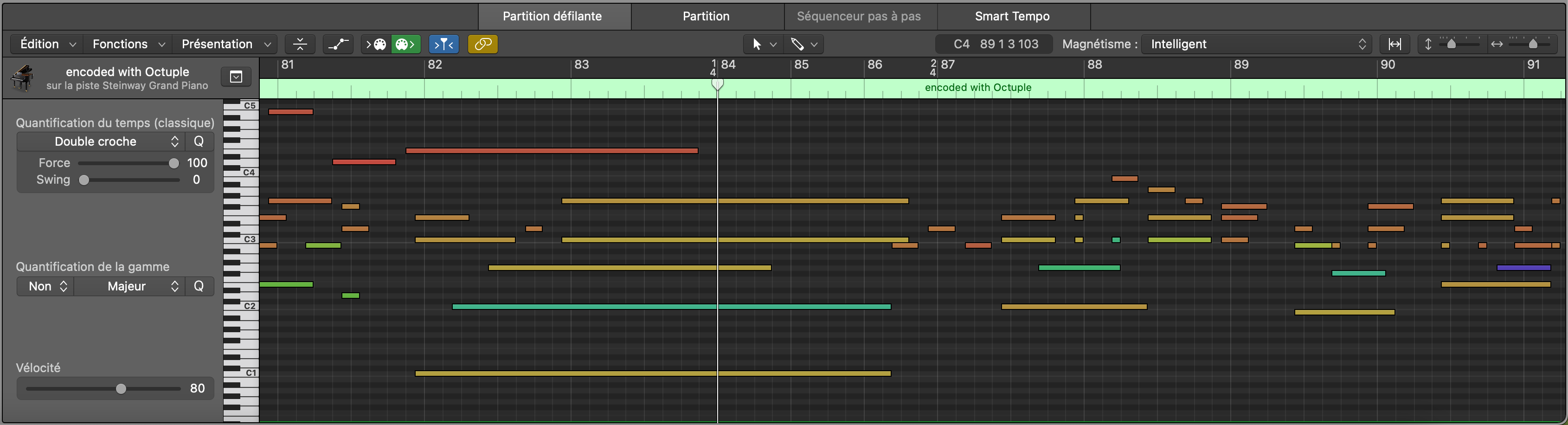
¹: using both time signatures and rests with miditok.CPWord might result in time alterations, as the time signature changes are carried with the Bar tokens which can be skipped during period of rests.
²: using time signatures with miditok.Octuple might result in time alterations, as the time signature changes are carried with the note onsets. An example is shown below.
Alternatively, Velocity and Duration tokens are optional and are enabled by default for all tokenizers.
Below is an example of how pitch intervals would be tokenized, with a max_pitch_interval of 15.
Special tokens
MidiTok offers to include some special tokens to the vocabulary. These tokens with no “musical” information can be used for training purposes.
To use special tokens, you must specify them with the special_tokens argument when creating a tokenizer. By default, this argument is set to ["PAD", "BOS", "EOS", "MASK"]. Their signification are:
PAD (
PAD_None): a padding token to use when training a model with batches of sequences of unequal lengths. The padding token id is often set to 0. If you use Hugging Face models, be sure to pad inputs with this tokens, and pad labels with -100.BOS (
SOS_None): “Start Of Sequence” token, indicating that a token sequence is beginning.EOS (
EOS_None): “End Of Sequence” tokens, indicating that a token sequence is ending. For autoregressive generation, this token can be used to stop it.MASK (
MASK_None): a masking token, to use when pre-training a (bidirectional) model with a self-supervised objective like BERT.
Note: you can use the tokenizer.special_tokens property to get the list of the special tokens of a tokenizer, and tokenizer.special_tokens for their ids.